- Home Page /
- Electronics /
- Computer Accessories /
- Tablet Replacement Parts /
- Screens /
- Touch Screen Panel Replacement for iPad Pro 1...
0 ratings






Item #:
95078953
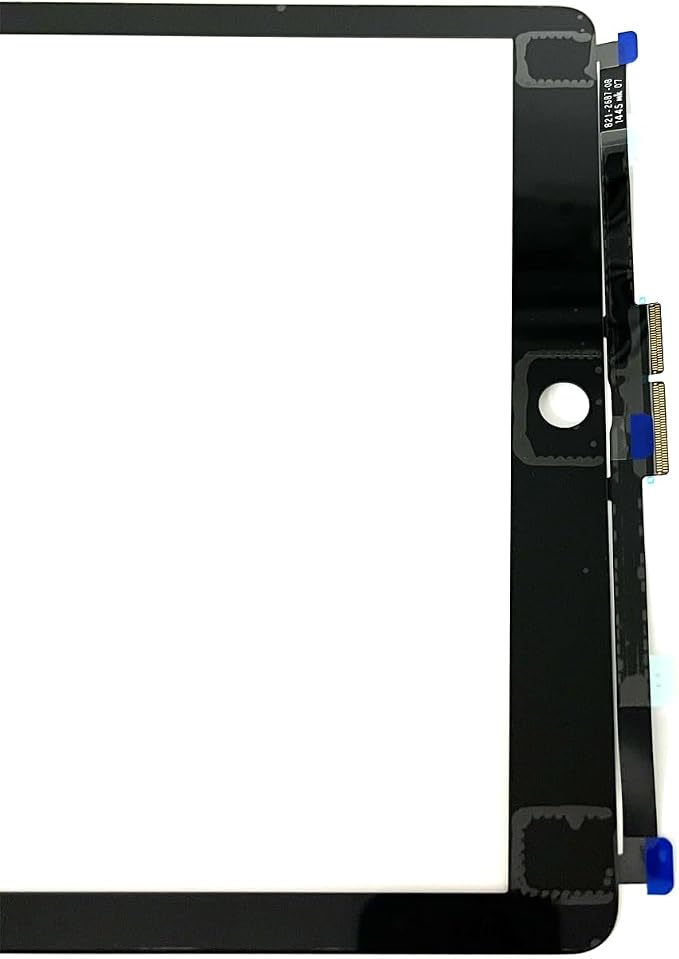
Touch Screen Panel Replacement for iPad Pro 12.9 1st 2015 A1584 A1652 (Black)
Item #:
95078953
ANG 99
Price Details
Excluding Shipping & Custom charges ( Shipping and custom charges will be calculated on checkout )
*All items will import from US
In stock
 Imported from USA store
QTY:
Only 7 items left in stock.
Order now and get it around Saturday, July 04
Secured transaction
Ubuy works hard to protect your security and privacy. Our advanced payment security system ensures confidentiality by encrypting your information during transmission using AES (Advanced Encryption Standards) and SSL (Secure Socket Layer) protocols. Your payment details are 100% secure as we do not share your payment details with third party sellers.
Our Top Logistics Partners


Repair or replace your damaged touch screen with our high-quality replacement panel for iPad Pro 12.9 1st 2015.

Fast
Shipping

Free
Return*

Secure Packaging

100% Original Products

PCI DSS Compliance

ISO 27001 Certified


What Stands Out
High Sensitivity
Designed for seamless touch responses, this panel ensures accurate and fast interaction, enhancing the user experience by maintaining the iPad's original touch sensitivity.
Durable Construction
Built with premium materials, the replacement panel is resistant to scratches and impacts, providing long-lasting durability and protecting your iPad Pro from everyday wear and tear.
Easy Installation
The user-friendly design allows for quick and hassle-free replacement, ensuring that you can restore your iPad Pro's functionality without professional help or complicated tools.
Product Details
- Touch Screen Panel Replacement for iPad Pro 12.9 1st 2015 A1584 A1652.
- For iPad Pro 12.9 1st 2015 A1584 A1652.
- Repair/Replacing old, broken, cracked, damaged faulty touch Screen.
- Each item has been checked and in good condition before shipping.
- If you have any question, please contact us. We will offer an excellent after-sell service.
| Package Dimensions | 14.29 x 10.67 x 1.61 inches (36.3 x 27.1 x 4.1 cm) |
| Item Weight | 12.3 ounces (348.71 grams) |
| Is Discontinued By Manufacturer | No |
| Other display features | Wireless |
| Color | Black |
| Manufacturer | MustPoint |
| Date First Available | December 9, 2014 |
Who Should Buy?

-
iPad Pro Users
Ideal for individuals needing a replacement touch screen due to damage or malfunction on their iPad Pro 12.9 1st gen.
-
DIY Enthusiasts
Great for tech-savvy users who prefer to repair their devices themselves rather than paying for professional services.
-
Budget-Conscious Consumers
Suitable for users looking to save money by replacing their screen instead of buying a new tablet.

-
Non-Technical Users
Not suitable for those who are not comfortable with electronic repairs and may face difficulty during installation.
-
Warranty Seekers
Users still under warranty should avoid replacements that can void their warranty and affect future repairs.
-
Time-Poor Individuals
This product may not be suitable for those lacking time to complete a repair, as it requires careful installation.
Product Description
Have any Query? Chat with us
Customer Questions & Answers
-
Question:
What are the key features of the Touch Screen Panel Replacement for iPad Pro 12.9 1st 2015?
Answer: The Touch Screen Panel Replacement for iPad Pro 12.9 (1st gen, 2015) offers high sensitivity and a precise touch experience. It is designed to match the original display's resolution, providing vivid colors and sharp images. The black finish ensures it blends seamlessly with your device's aesthetics. This replacement is ideal for users whose screens have cracked or are unresponsive due to damage, allowing you to restore your device to optimal functionality and appearance. -
Question:
How do I install the Touch Screen Panel Replacement?
Answer: To install the Touch Screen Panel Replacement, you'll need to carefully remove the old screen using appropriate tools, such as a heat gun or suction cup. Follow up with disconnecting the battery, removing the ribbon cables, and then positioning the new panel in place. Refer to online video tutorials for step-by-step guidance, ensuring that you handle each component gently to prevent damage. This DIY approach not only saves costs but also enhances your technical skills. -
Question:
Is professional installation recommended for this product?
Answer: While it is possible to install the Touch Screen Panel Replacement yourself, professional installation is recommended, especially for those unfamiliar with electronics repair. Technicians have the experience and tools to ensure a precise, safe installation, which can minimize the risk of damaging other components. If you value your time and want peace of mind, opting for a professional can lead to a more reliable outcome. -
Question:
What tools do I need for the installation?
Answer: For installing the Touch Screen Panel Replacement, you will need tools such as a heat gun or hair dryer to soften adhesive, a suction cup to lift the screen, and a set of precision screwdrivers to access internal components. Additionally, a plastic spudger will help to detach the old screen without scratching the device. Having the right tools on hand makes a significant difference in the installation process and the final result. -
Question:
What should I do if the new screen does not respond?
Answer: If the new Touch Screen Panel does not respond, first ensure all connections are secure and properly seated. Sometimes, the digitizer may be loose or not connected properly to the motherboard. Try reconnecting the display cables and perform a soft reset of the iPad by pressing the power and home buttons together. If issues persist, reaching out to a professional for further diagnostics is advisable to prevent hardware damage. -
Question:
How does this replacement affect my iPad’s display quality?
Answer: The Touch Screen Panel Replacement is designed to maintain the same display quality as the original. It offers full resolution capabilities, clear visuals, and bright colors. Users can expect their iPad Pro to have restored performance akin to its initial state, making it a reliable option for those who rely on their devices for work or entertainment. -
Question:
Are there any compatibility issues I should be aware of?
Answer: This Touch Screen Panel Replacement is specifically designed for the iPad Pro 12.9 (1st generation, 2015) models A1584 and A1652. It’s essential to confirm your model number before purchasing, as using a panel meant for a different version could result in improper fitting or function. Double-checking compatibility helps ensure a smooth installation and functionality post-replacement. -
Question:
Can I use my iPad while waiting for the replacement screen?
Answer: Using your iPad while it has a damaged screen can lead to further damage or injuries, especially with cracks or chips. It is advisable to limit use until the Touch Screen Panel Replacement is installed. You can back up your data before proceeding with the replacement to ensure all information is safe. Once the new screen is in place, you can enjoy your device fully restored. -
Question:
Where can I buy Touch Screen Panel Replacement for iPad Pro 12.9 1st 2015 A1584 A1652 Black?
Answer: You can buy the Touch Screen Panel Replacement for the iPad Pro 12.9 1st 2015 A1584 A1652 Black at Ubuy in Sint Maarten. Ubuy offers a wide range of electronic accessories, ensuring you find a compatible and high-quality replacement for your device. They focus on providing a seamless shopping experience for tech needs. -
Question:
What are the signs that I need to replace my touchscreen panel?
Answer: You may need to replace your touchscreen panel if you notice issues such as unresponsive areas on the screen, visible cracks or scratches, or flickering displays. Additionally, if the device cannot detect touch actions or if the screen is discolored, these are clear indicators that a replacement is necessary. Addressing these problems promptly can restore functionality and improve your device's usability.
Mustpoint Screens Editorial Review
No editorial reviews found
Customer Reviews & Ratings
17 customers ratings
-
5 Star
23%
-
4 Star
18%
-
3 Star
28%
-
2 Star
22%
-
1 Star
9%
Review this product
Share your thoughts with other customers
Product Price History
Important information
- Limitations : For products shipped internationally, please note that any manufacturer warranty may not be valid; manufacturer service options may not be available; product manuals, instructions, and safety warnings may not be in destination country languages; the products (and accompanying materials) may not be designed in accordance with destination country standards, specifications, and labeling requirements; and the products may not conform to destination country voltage and other electrical standards (requiring use of an adapter or converter if appropriate). The recipient is responsible for assuring that the product can be lawfully imported to the destination country. When ordering from Ubuy or its affiliates, the recipient is the importer of record and must comply with all laws and regulations of the destination country.
- Not all the products listed on Ubuy are for sale, as Ubuy is a global search engine. Products are subject to export/trade regulations.
ANG 99
Order now and get it around Saturday, July 04
This item is not restrict in my country.(Please click on above link if this item is not restrict in your country, So our team will review and allow.)
QTY:
Only 7 items left in stock.
Secured transaction
Ubuy works hard to protect your security and privacy. Our advanced payment security system ensures confidentiality by encrypting your information during transmission using AES (Advanced Encryption Standards) and SSL (Secure Socket Layer) protocols. Your payment details are 100% secure as we do not share your payment details with third party sellers.
Our Top Logistics Partners
Fastest cross-border delivery
Features & Benefits
- Designed specifically for iPad Pro 12.9 1st 2015 models (A1584, A1652).
- Effectively repairs broken, cracked, or faulty screens.
- Each item is thoroughly checked for quality before shipping.
- Ensures excellent functionality and user experience.
- Quick and easy installation to restore your device.
- Outstanding after-sales service to support your purchase.