- Home Page /
- Office Products /
- Office Electronics /
- Scanner & Accessories /
- Computer Scanner /
- Document Scanner /
- RICOH fi-8040 Fast Front Office & Desktop Doc...
0 ratings





Item #:
222116647
RICOH fi-8040 Fast Front Office & Desktop Document, Receipt, ID Card Scanner with 50 Page Auto Feeder and PC-Less DirectScan Network Scanning
85% of respondents would recommend this to a friend
Item #:
222116647
ANG 1124
Price Details
Excluding Shipping & Custom charges ( Shipping and custom charges will be calculated on checkout )
*All items will import from US
In stock
 Imported from USA store
QTY:
Only 10 items left in stock.
Order now and get it around Sunday, June 28
Secured transaction
Ubuy works hard to protect your security and privacy. Our advanced payment security system ensures confidentiality by encrypting your information during transmission using AES (Advanced Encryption Standards) and SSL (Secure Socket Layer) protocols. Your payment details are 100% secure as we do not share your payment details with third party sellers.
Our Top Logistics Partners


FAST SCANNING. MINIMAL EFFORT.

Fast
Shipping

Free
Return*

Secure Packaging

100% Original Products

PCI DSS Compliance

ISO 27001 Certified


What Stands Out
50 Page Auto Feeder
Streamline document processing with a 50-page automatic feeder, increasing efficiency for busy offices while reducing manual handling and allowing for uninterrupted scanning of multiple documents.
PC-Less DirectScan
Utilizes PC-less DirectScan technology to connect directly to network folders or email, simplifying the workflow by eliminating the need for a connected computer, ideal for teams needing quick digital access.
Versatile Scanning
Effectively scans various media types—including documents, receipts, and ID cards—making it a versatile tool for any office environment, meeting diverse scanning needs without compromising quality.
Product Details
- Compact and equipped with a user-friendly 4.3-inch touch screen, the fi-8040 reliably and quickly scans at up to 40ppm/80ipm
- New "DirectScan" feature enables PC-Less scanning directly to various destinations including email and network folders
- Achieve superior image quality with Clear Image Capture, industry-leading image processing with a new, proprietary color-matching processor
- Easy-to-use software interface provides convenient scanning, powerful image enhancement and indexing options, including optical character recognition (OCR).
- Included PaperStream ClickScan software delivers scanning simplicity and works alongside of any workflow to meet your imaging needs. Place paper in the scanner, push the scan button, and send to email, print, or folder - simple as one, two, three
| Scanner Type | Document, ID Card |
| Connection Type | Ethernet, USB |
| Resolution | 600 |
| Wattage | 19 watts |
| Color Depth | 24 bpp |
| Standard Sheet Capacity | 50 |
| Optical Sensor Technology | CIS |
| Greyscale Depth | 8 bits |
| Media Type | Business Card, Embossed Card, ID Card, Paper, Receipt |
| Light Source Type | LED |
| Minimum System Requirements | Windows XP Home |
| Brand | Ricoh |
| Model Name | fi-8040 |
| UPC | 097564310041 |
| Manufacturer | PFU Limited |
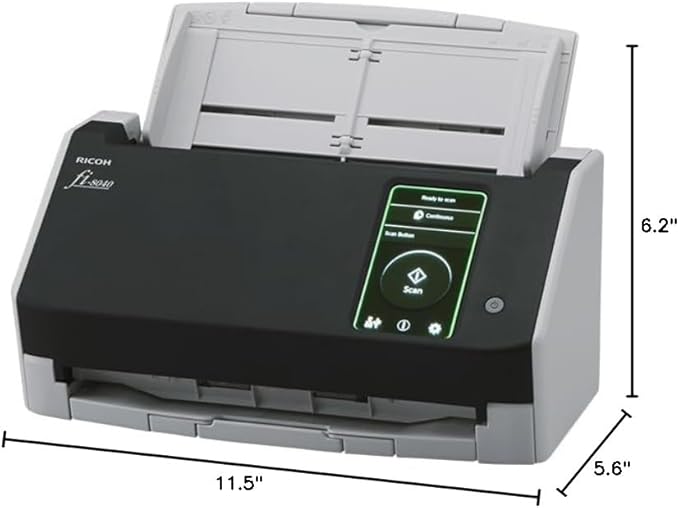
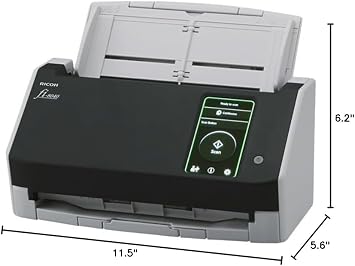
| Item Dimensions D x W x H | 5.6"D x 11.5"W x 6.2"H (14.2 x 29.2 x 15.7 cm) |
| Item Weight | 6.8 Pounds (3.08 kg) |
| Connectivity Technology | Ethernet, USB |
| Product Dimensions (L x W x H) | 5.6"D x 11.5"W x 6.2"H (14.2 x 29.2 x 15.7 cm) |
Who Should Buy?

-
Small Businesses
Ideal for small businesses needing efficient document management and fast scanning of receipts and documents.
-
Healthcare Offices
Perfect for healthcare offices that require quick and secure scanning of patient ID cards and documents.
-
Remote Workers
Suitable for remote employees wishing to scan documents directly to cloud storage without a PC.

-
High Volume Users
Not ideal for high volume users due to potential wear and tear with intensive daily use.
-
Limited Budget
May not be suitable for users on a tight budget, considering the initial investment and ongoing costs.
-
Occasional Users
Not recommended for users who scan documents infrequently, as it may be more than needed for occasional scanning.
Product Description
Have any Query? Chat with us
Related Searches
Customer Questions & Answers
-
Question:
What features make the RICOH fi-8170 scanner stand out?
Answer: The RICOH fi-8170 document scanner offers advanced features such as high-speed duplex scanning, allowing you to scan both sides of a page simultaneously, which significantly boosts productivity. With a scanning speed of up to 70 pages per minute, this scanner is ideal for busy office environments. It supports various document types, including mixed media, which means you can scan everything from thin receipts to thick card stock without any hassle. -
Question:
Is the RICOH fi-8170 suitable for small businesses?
Answer: Yes, the RICOH fi-8170 is an excellent choice for small businesses. Its compact design does not sacrifice performance, providing robust scanning options that help manage documents efficiently. It streamlines workflows by allowing users to quickly digitize paperwork, making it indispensable for tasks like archiving, invoicing, and information sharing. This ensures that businesses can maintain productivity while keeping physical space uncluttered. -
Question:
How does network connectivity work with the RICOH fi-8170?
Answer: The network-enabled functionality of the RICOH fi-8170 allows multiple users to access the scanner from various devices within the same network. This is achieved through both Ethernet and Wi-Fi connections, making it versatile for different office setups. Users can easily scan documents directly to their computers or shared cloud services, enhancing collaborative work and making it easier to manage documents across teams. -
Question:
Can the RICOH fi-8170 handle large volumes of scanning?
Answer: Absolutely! The RICOH fi-8170 is designed for high-volume scanning, capable of processing large batches of documents efficiently. Its robust input tray can hold up to 100 sheets, reducing the need for frequent refilling. This feature is particularly useful for environments such as law offices or medical facilities that require a fast turnaround of documentation while maintaining quality and accuracy. -
Question:
What types of documents can I scan with the RICOH fi-8170?
Answer: The RICOH fi-8170 can scan a wide variety of documents, including standard paper, business cards, and even plastic ID cards. Its ability to handle various media types makes it versatile for professionals who deal with different document formats. This flexibility is crucial for sectors such as finance and healthcare, where different types of documentation need to be processed regularly. -
Question:
Is scanning in color possible with the RICOH fi-8170?
Answer: Yes, the RICOH fi-8170 provides high-quality color scanning capabilities, which is essential for capturing vibrant details in images and graphics. Whether you are digitizing marketing materials, photos, or detailed reports, the color scanning feature ensures that every nuance is preserved. This makes it particularly useful for creative professionals and businesses that rely on accurate color representation in their documents. -
Question:
How does the scanner handle document feeding?
Answer: The RICOH fi-8170 features advanced document feeding technology that minimizes jams and misfeeds, ensuring uninterrupted scanning. It utilizes ultrasonic sensors to detect double feeds, allowing the scanner to handle mixed batches seamlessly. This feature enhances efficiency particularly during large scanning tasks, where the user can trust that every document will be processed accurately. -
Question:
Can the RICOH fi-8170 integrate with scanning software?
Answer: Yes, the RICOH fi-8170 is compatible with various scanning software and document management systems, enhancing its functionality. Whether you use Windows or macOS, integrating the scanner with your preferred software allows for streamlined document processing and organization. This integration makes it easier for businesses to implement efficient document workflows and automate tasks like archiving and sharing. -
Question:
What are the power requirements for the RICOH fi-8170?
Answer: The RICOH fi-8170 requires standard electrical outlets and operates effectively with low power consumption. This is beneficial for a wide range of office environments where energy efficiency is essential. By not requiring specialized setups, the scanner can easily be integrated into existing office layouts, making it both user-friendly and energy-efficient. -
Question:
Where can I buy the RICOH fi-8170 Professional High Speed Color Duplex Document Scanner - Network Enabled in Sint Maarten?
Answer: You can purchase the RICOH fi-8170 Professional High Speed Color Duplex Document Scanner - Network Enabled from Ubuy in Sint Maarten. They offer a reliable e-commerce platform with a wide range of electronics and office equipment, making it easy to find and acquire this advanced scanner suited for your professional needs.
Ricoh Document Scanners Editorial Review





The RICOH fi-8040 Fast Front Office Scanner has garnered a mixed reception among users, striking a balance between impressive speed and notable frustrations regarding its functionality. On the positive side, many customers appreciate its fast scanning capabilities and ease of use, expressing satisfaction with the quality of scans, particularly when using the auto document feeder feature. This makes it a suitable option for various scanning needs, from documents to receipts. However, the experience has not been universally positive. A significant number of users have reported frequent jams, particularly when attempting to scan sports cards or thicker materials like toploaders. Some even noted that the device can damage cards during the process, which is a critical concern for those scanning valuable items. Additionally, issues with scan distortions and poor results—such as images coming out too dark for certain card types—have led many to revert to more traditional scanning methods, such as taking photos. Another point of criticism is the scanner’s software. Many found the included free version cumbersome and lacking in features, though some acknowledged that a premium version might offer a better experience. Further complicating the user experience is the difficulty in configuring the scanner to function effectively with popular email services like Office365, leading to frustrations around compatibility. In summary, the RICOH fi-8040 has potential, especially for standard document scanning, but falls short for users hoping to scan more delicate or valuable items without risk of damage. Given its issues, users are urged to weigh their options carefully before investing in this product. **
Customer Reviews & Ratings
37 customers ratings
-
5 Star
65%
-
4 Star
11%
-
3 Star
5%
-
2 Star
7%
-
1 Star
12%
Review this product
Share your thoughts with other customers
Pros
- Fast scanning speeds.
- Simple to use, especially with the auto document feeder.
- Good quality scans for standard documents.
Cons
- Frequent paper jams, particularly with toploaders and card savers.
Top selling RICOH Document Scanner in New Zealand


Last Updated on June 8, 2026
Product Price History
Important information
- Limitations : For products shipped internationally, please note that any manufacturer warranty may not be valid; manufacturer service options may not be available; product manuals, instructions, and safety warnings may not be in destination country languages; the products (and accompanying materials) may not be designed in accordance with destination country standards, specifications, and labeling requirements; and the products may not conform to destination country voltage and other electrical standards (requiring use of an adapter or converter if appropriate). The recipient is responsible for assuring that the product can be lawfully imported to the destination country. When ordering from Ubuy or its affiliates, the recipient is the importer of record and must comply with all laws and regulations of the destination country.
- Not all the products listed on Ubuy are for sale, as Ubuy is a global search engine. Products are subject to export/trade regulations.
ANG 1124
Order now and get it around Sunday, June 28
This item is not restrict in my country.(Please click on above link if this item is not restrict in your country, So our team will review and allow.)
QTY:
Only 10 items left in stock.
Secured transaction
Ubuy works hard to protect your security and privacy. Our advanced payment security system ensures confidentiality by encrypting your information during transmission using AES (Advanced Encryption Standards) and SSL (Secure Socket Layer) protocols. Your payment details are 100% secure as we do not share your payment details with third party sellers.
Our Top Logistics Partners
Fastest cross-border delivery
Features & Benefits
- Scans 40 double-sided pages per minute.
- Easy-to-use touchscreen and PaperStream software.
- DirectScan allows scanning without a PC.
- Industry-leading image quality with Clear Image Capture.
- Features image enhancement and OCR for editable documents.
- One-touch scanning with PaperStream ClickScan software.